I am a real novice diy'er - 20 years ago moved into a new house and had an HAI omnipro system for most of the lights installed. I have a hallway that has 3 different switches that can turn them on/off. Yesterday noticed that all the lights were out - thought it was bulbs but when new bulbs didnt work - checked breakers - which were fine - went to my hai touchscreen - and was able to turn the lights on. but cannot seem to turn them on from the switches. i did turn them off from one of the switches. Is it likely that one or all of the switches are dead? the light is still blue in 2 of them but no light on the 3rd - does that indicate the bad switch. (That was the switch that turned the lights off). Also - if I just buy 3 new switches - what do i have to do in the system to add them to the software? I've never messed with adding units - only doing the programming for on/off etc. I am using PC Access version 3.11.4.697. I am not in a position to upgrade the whole system so whatever is the easiest/cheapest band-aid is what I will do. Thanks in advance for any and all advice and guidance!

You are using an out of date browser. It may not display this or other websites correctly.
You should upgrade or use an alternative browser.
You should upgrade or use an alternative browser.
3-way HAI switch seems to have gone bad - help needed
- Thread starter margol
- Start date
So there are different possibilities here. I was never a fan of this, but to save money, sometimes they would just use one real switch to control the lights, and the other two would be "remote" switches. These remote switches just used one wire to control the real switch. These "remote" switches don't typically have the same color indicator light as the real switches. The second way, and more expensive way is to use multiple real switches with some maybe not controlling any real lights. They are just transmitters that control the real switches via UPB. So the question is, which do you have? Real switches give a slight buzz when you press them, they may be warm, and feel better made. Remote switches don't buzz, don't get warm, and feel cheap. Remote switches don't usually go bad. Anyway, its easy in UPStart to replace a switch without much work.
Thanks! as far as i can tell - the switches are the same as every other switch in the house... since they are not working now - I don't get that buzz/or warmth - but they appear to be the same as all the other switches, it's been awhile but I don't remember buying different types of switches. Is there anyway to know for sure? If i take off the plate that covers the switch and pull it out - will i be able to tell a difference?
So each switch has a paddle that moves, and around that paddle is a thin line of plastic the surrounds the paddle, and the switchplate install over that. on the BOTTOM of this plastic "frame" look carefully, is there a split, and if so can you use your fingernail and pull the split to you? This is the AC cutoff required on each switch. If so, this is a real switch, if not its a remote switch.
You said you have PC Access connected. If so, you should be able to control each switch from the control tab. I assumed these are UPB switches, but do you know for sure? In PCAccess you should see the switches listed and in each row, it will say the type. They could be UPB, or ALC, or RadioRA or NUVO, or CentraLITE.
You said you have PC Access connected. If so, you should be able to control each switch from the control tab. I assumed these are UPB switches, but do you know for sure? In PCAccess you should see the switches listed and in each row, it will say the type. They could be UPB, or ALC, or RadioRA or NUVO, or CentraLITE.
sorry for the delayed reply... thank you very much for your responses - I checked the switches - and they do have the split - i can't pull it but maybe i need to remove the faceplate? In Pcaccess - all of my switches are listed as HAI Lighting Control (HLC). What is my next step? Thank you in advance!
OK so that makes it easy to debug. So only one switch actually controls a light, the others likely just generate links to that one switch. That is the best way to do it. So in UPStart, or in PCAccess. you can or should be able to control each switch. If you can't control each switch, they are either broken or they have poor communications. Usually poor communications is more likely because usually the switch contacts on the paddles are all that go bad.
thanks. I went into pcaccess and unfortunately - i don't have labels for the 3 different switches that control these lights. There is a unit labelled as "2nd floor hall" which works if i send on/off command from pc access. but i don't have any units labelled specifically for the 3 different switches that control those lights. I do have some random unlabled units interspersed that i thought might be the units that i'm looking for - but they don't seem to do anything (see attachment). Also - how do I know which unit is connected to the relevant label? where should I go from here? Thanks.OK so that makes it easy to debug. So only one switch actually controls a light, the others likely just generate links to that one switch. That is the best way to do it. So in UPStart, or in PCAccess. you can or should be able to control each switch. If you can't control each switch, they are either broken or they have poor communications. Usually poor communications is more likely because usually the switch contacts on the paddles are all that go bad.
Attachments
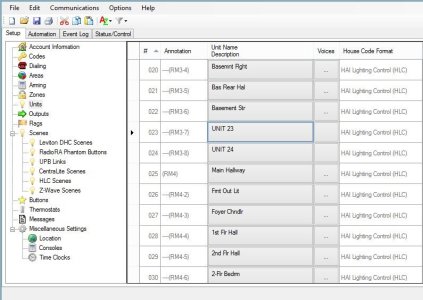
So I'm not sure I understand. These switches are not controlled by the HAI panel? Sounds like you have switches but you don't think they work but you don't really know what they do? Do they just control each other, but have no other purpose? UPB can do that, a switch can control another switch without a controller, but its a bit strange. If its just switches controlling each other then PCAccess won't be much help, since it sounds like the panel doesn't have a need to control them. UPStart is the free Windows software that can directly program UPB switches. You can download it here: UPStart
I do have an HAI panel - I assume that it controls all the switches - I just meant to say that I have 3 switches that control the same group of lights. But in PCAccess - I don't see 3 unique entries for the switches. I just see an entry called 2nd floor Hall. I don't know what that means... Is there any benefit to removing the faceplates and physically looking at the switches? What would I do with the USPStart app? Is it possible that I would see more info in the installer version of PCaccess? Please let me know what other info I can give you to be helpful. Thank you very much for helping me out!So I'm not sure I understand. These switches are not controlled by the HAI panel? Sounds like you have switches but you don't think they work but you don't really know what they do? Do they just control each other, but have no other purpose? UPB can do that, a switch can control another switch without a controller, but its a bit strange. If its just switches controlling each other then PCAccess won't be much help, since it sounds like the panel doesn't have a need to control them. UPStart is the free Windows software that can directly program UPB switches. You can download it here: UPStart
In your first post, you say you "can" control the light in question from the panel, but can't from these other switches. So the problem is these other switches. The panel can program switches, but only in certain ways, and a "3-way" or "4-way" configuration is not one of them. So this MUST have been done in UPStart app. which lets you do more. So the former owner must have used it. Its the only way to create this 3-way or 4-way linking. So the only way to maintain or establish the links between these extra switches and the lights you want them to control is UPStart. OR you could add all the switches to the panel, then write code so when one switch turns on, the panel turns on the light, and when one switch turns off, the panel turns off the light. Witch UPStart, you can program the "links" in the switches directly, so any switch can control any other switch directly, but, for the most part, the "normal" way of working with the panel is having all switches wired to it, and then using logic in the panel control each switch. If you use links in UPStart to do this, the response is instant of having one switch control another. If you have the panel do it, it can be slower. The panel has to receive the signal, then do some logic, then transmit the signal to the other switch its changing, do there is some delay.
sorry again for the delayed response. I have no idea how, but the switches have miraculously started working again... So all is good for now at least. That said - I downloaded the Upstart app - but when i start it up, it says that there is no powerline connection. screenshot below. Not sure if i will need it in the future... but how do i connect it to my system? Thanks again for your help! 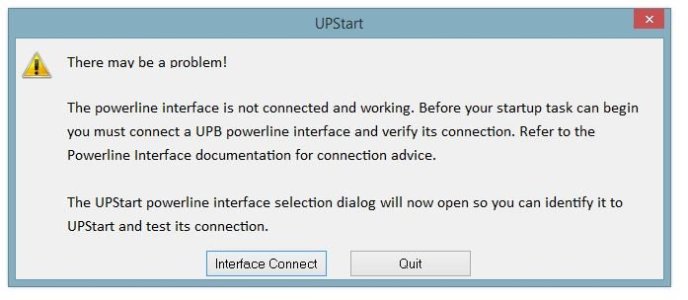
UPStart requires a USB powerline interface to be connected to the computer running it, since its independent of the HAI panel and its UPB powerline adapter. You can buy them with three types of interfaces, RS-232 serial, USB, or HAI serial. For a PC, USB is usually the easiest.
Yes, they both can be connected at the same time. You can have as many as you like. UPStart In fact, any switch can control any other switch even without a controller. Its a nifty technology and reliable.is your UPB interface still connected to the Omni?
yes - the upb box is plugged into the omni controller. are you saying that if i want to use upstart - that i would need to buy another interface to connect to the computer? Is that the only way to use the program? Also - given that my original issue seems to have resolved itself somehow, what is the benefit of upstart? what can i do with it? Do i need it? Thanks.Yes, they both can be connected at the same time. You can have as many as you like. UPStart In fact, any switch can control any other switch even without a controller. Its a nifty technology and reliable.
Similar threads
- Question
- Replies
- 6
- Views
- 450

- Replies
- 0
- Views
- 743