Can I get a recommendation for an ESP based LED controller?

linuxha

Active Member
I need to add white LED lighting for under kitchen cabinets. I'd like to be able to dim and brighten the LEDs automatically (probably using Pete's recommendation of a sonoff and a PIR sesor). I have the automation but I'd need a Wifi controller I can update to some software such as ESPurna or Tasmota.
 
So far for an off the shelf WiFi controller have seen the "cloud based" smart phone mechanisms of control....say like for Samsung Smartthings...
 
When introduced many of the applications for closed or open software did the controlling via the cloud.
 
Now recently seen it (plugins) available for open and closed software changing the firmware such that it'll work without the cloud using Tasmota, ESPurna, et al.
 
Relating to WiFi in general here sandbox OpenWRT micro routers and recently test added Mosquitto functions using Python.  Seeing here that it can be done.  It is though a bit limited relating to CPU and workspace on these little routers.
 
Maybe though I am not totally understanding what you are looking for?
 
The old and replaced under the counter lighting was just on 24/7 and never touched. 
 
Here the concern of deployment of LEDs related to color and brightness (density) such that I built three plug n play aluminum track / diffusers relating to WAF.
 
She likes the LED around 5000k with SMD5050 LEDs bright white the best.  My thing was automation to learn a bit and to reduce the light in the Kitchen for my parrot which lately has decided now to sleep cocoon like in her linus blanket totally blocking out any light in her environment. (she's old now). I hear her growling at her blanket as she arranges it for sleep these days.
 
Here made (and still testing) the under the counter LED configuration modular for use with or without any automation putting the LED driver in the electrical box.
 
I have found a commercial in combo LED switch, dimmer and driver for $100 and up with no automation.  No match yet in the automation world.
 
You can purchase a 120VAC toroidal LED driver that is dimmable at the 120VAC end with any automation switch including WiFi.
 
After looking at a few options, I picked up Hue light strips. They are full color RGB and wifi based (you will need a hub in the house), but you don't have to make them cloud based, which is nice. I run them all internal (no cloud, except for allowing Siri to control them) for under kitchen cabinets. They are a little pricey, but you can find refurbs on eBay at a discount. They are Siri enabled now, as well as app controllable (local control.) I haven't really automated mine as we tend to turn them on demand using Siri mostly. They work with Alexa as well, although if you want full color and dimming you have to hook Alexa to the Philips cloud. On and off work without cloud connection enabled with Alexa. Oddly, Siri can do full color and dimming without hooking to the Philips cloud service.<br /><br />Just another option, in case you are second guessing the roll-your-own options.<br /><br />Oh, Philips is adding some local automation as well. They have some rules you can add to their hub. But it seems to be pretty simple so far. I tried their sunrise/sunset options just last week and found them not what I really wanted. I figured turning the cabinet counter lights on at sunset and off at sunrise would be a simple task, and Philips has sunset plus a delay... But their idea of sunset seems to be later then I would expect (it claims to be location corrected as well), so it comes on late, and the delay adjustment only makes it later, with no +- adjustment, just one direction. I suspect they'll make it more adjustable eventually, but I was unimpressed with their idea of automation.

 
pete_c said:
Maybe though I am not totally understanding what you are looking for?
I'm looking for a dimmable LED controller based on the ESP so I can avoid the cloud. Just on, off and dim levels, no colors. I'll use the source (like Tasmota) that allows me to use MQTT. I'm currently using MQTT and Node-Red pretty heavily. I haven't worked out the automation yet. My wife likes having the manual interface so i need a way to handle that but she is finding the automation more and more useful.
Here the concern of deployment of LEDs related to color and brightness (density) such that I built three plug n play aluminum track / diffusers relating to WAF.
 
She likes the LED around 5000k with SMD5050 LEDs bright white the best.  My thing was automation to learn a bit and to reduce the light in the Kitchen for my parrot which lately has decided now to sleep cocoon like in her linus blanket totally blocking out any light in her environment. (she's old now). I hear her growling at her blanket as she arranges it for sleep these days.
My wife and I prefer Warm White (2700 - 3000). To start with it will be just on and off. But I know my wife will want to be able to dim the lights. That part of the automation needs to be worked out. I also need to make an PIR sensor that won't trigger on the dogs. That will be a while on the test bench.
 
I'm looking for a dimmable LED controller based on the ESP so I can avoid the cloud. Just on, off and dim levels, no colors. I'll use the source (like Tasmota) that allows me to use MQTT. I'm currently using MQTT and Node-Red pretty heavily. I haven't worked out the automation yet. My wife likes having the manual interface so i need a way to handle that but she is finding the automation more and more useful.
 
I am trying the same here. 
 
I only found a none automated in wall LED power supply combo 12VDC LED switch and dimmer.  Looks nice, footprint is OK but price starts at over $100 for a 30 watt combo with prices going toward $200 for a ~80 watt 12VDC dimmer.
 
Testing LED strips - I just made up a few to test color and brightness for wife. 
 
1 - first LED strip I tried is an indoor / outdoor LG Innotek commercial style ~ 4000k LED lamp which I purchased from All Electronics.  Personally not too white and not too warm.  The lamps are configured in groups of 3 for around $4 each.  I used a string of 10 which were around $40.  Power draw on the 10 was around .72 AMPs.  These were too big for the track / diffusers that I purchased.  They do come with 3M sticky tape and little holes on each module to mount them.
 
2 - purchased a set of 5 aluminum tracks and diffusers from Amazon for around $17 to test Amazon Strips.
 
3 - purchased a spool of warm 3000K LED lamps and white 5000k LED lamps. 
 
I made up test aluminum tracks and diffusers with the above.  I got faster at this once one was made up. 
 
The above with power supply and 120VAC work fine with no automation or with 120VAC wall switch automation except you get no dimming.
 
For my Mosquitto controlled automation purchased the following.  Base here today is two RPi2's running Node Red / OWFS / 1-Wire with one of them running a Mosquitto Broker.  I also recently installed a couple of python scripts on my testing openwrt micro routers which work well.  I am also using a new Homeseer 3 plugin called mcsMQTT which assigns mosquitto in and out variables to homeseer variables.  The plugin works like a Mosquitto sniffer (similiar to xAP or xPL) and is text based.  Node Red does give you a nice visual experience. 
 
Hardware used:
 
1 - Sonoff SV - just an ESP board with relay and exposed GPIO pins.  You can switch up to 240VAC with it and relay.  I used the 12VDC LED power supply for the power and relay output.  I put JTAG pins on it to tinker with Tasmota, mcsTasmota and ESPURNA 1.13.1 firmware on it.  Initially tried Tasmota then went to testing ESPURNA 1.13.1. There is only an on and off toggle configured with Mosquitto on it.  I programmed it such that the relay goes on when powered on. 
 
I toggle it with mosquitto command
 
KitchenLEDs/relay/0/set
 
to turn it on or off and read the status with mosquitto command
 
KitchenLEDs/data:relay/0
 
Dimming is an autonomous endeavor as there is no dimming built in to the Sonoff SV.  It would be similiar to motor control.
 
Meanwhile wanted dimming so purchased a 12VDC LED dimmer with potentiometer.  It's just a tiny circuit board in a box.  I got three of these for less than $5.  Thinking they are around $1 on Ebay.  You can purchase tiny manual and RF remote controlled ones for less than $5 on Ebay.
 
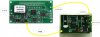
I fit the SonOff SV, dimming circuit board and potentiometer in a small depth plastic project box under the counter.  It is only on and off automated and remembers the dim level set by the pot.
 
Next steps in progress are automation of the 12VDC level with Mosquitto.  Googling arduino 12VDC dimming projects and see that it can be done.
 
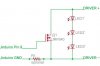
Arduino dimming circuit.    
 
arduinodimmer.jpg  
 
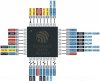
The Sonoff SV comes with an ESP8266 chip.    
 
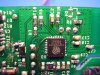
I did solder a wire to the ESP8266 chip on the Sonoff Wifi basic module.   
 
PITA for GPIO I put hot melt glue on the solder connection to keep the wire in place.  
 
esp.jpg
 
Arduino Pin #9 is just used for PWM (Pulse-width modulation).
 
So which pin is it that we utilize on the Sonoff ESP8266 for PWM?
 
and once hard wired then a modification will be needed to the ESP or Tasmota firmware to control this.
 
Thinking that I can do this with the el cheapo dimming circuit board with the pot connected to the Sonoff SV.
 
IE: $4 Sonoff SV plus $2 dimming circuit and pot would be very reasonably priced.
 
Looks also like ITead did sell a sonoff RGB LED controller (on off dim and color control) at one time.
 
@Neil Help please figure this out using a Sonoff SV. I have duplicates of everything on the workbench. I have been using Arduino IDE on Ubuntu to program the SonOffs for tinkering.
 
Thinking it is only one wire that we need to control here for dimming of 12VDC.
 
A little bit of a tangent here.....  
 
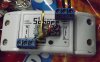
Yesterday finished a test Sonoff Wifi Basic to be utilized as a 1-wire hub for temperature and humidity.  Works fine and cheap. 
 
This will be replacing my RPi OWFS Node Red boxes. 
 
The Node Red will remain on the RPi except will not be using OWFS anymore and making the 1-wire solid state.
 
The top 3 terminals are GPIO and ground used for sensing switches.
 
Relay terminals separate.
 
Bottom three terminals are 5VDC, DQ and Ground for DS18B20 sensors.  Adding more for humidity sensors. 
 
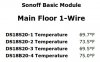
mainfloor.jpg  
 
sonoffwifibasiconewire.jpg

Here is what Mosquitto looks like coming from the device.

07:02:58 MQT: /1Wire/SENSOR = {"Time":"2018-09-08T07:02:58", "Switch1":"On", "Switch2":"On", "DS18x20":{"DS1":{"Type":"DS18S20", "Address":"10AE56130008007B", "Temperature":71.2}, "DS2":{"Type":"DS18S20", "Address":"10A52F47000800CB", "Temperature":70.1}, "DS3":{"Type":"DS18S20", "Address":"104B5613000800B9", "Temperature":71.2}, "DS4":{"Type":"DS18B20", "Address":"280D7E5B04000049", "Temperature":77.2}}, "TempUnit":"F"}          
 
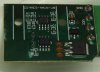
Here is a picture of the circuit board I am using to dim the LEDs.       
 
Thinking maybe to tap in to this circuit board from the SonOff for automated with manual (pot) dim control.    
 
You can find these for around $2 each in the case with the pot.  
 
Looking to do this:  
 
dimmersmall.jpg   
 
PVMA1.jpg
 
Confident that there is a way for this to work. I have already put a mosquitto dimmer and toggle control for the new LED lamps.
 
toggle.jpg
 
cobra said:
After looking at a few options, I picked up Hue light strips. They are full color RGB and wifi based (you will need a hub in the house), but you don't have to make them cloud based, which is nice. I run them all internal (no cloud, except for allowing Siri to control them) for under kitchen cabinets. They are a little pricey, but you can find refurbs on eBay at a discount. They are Siri enabled now, as well as app controllable (local control.) I haven't really automated mine as we tend to turn them on demand using Siri mostly. They work with Alexa as well, although if you want full color and dimming you have to hook Alexa to the Philips cloud. On and off work without cloud connection enabled with Alexa. Oddly, Siri can do full color and dimming without hooking to the Philips cloud service.<br /><br />Just another option, in case you are second guessing the roll-your-own options.<br /><br />Oh, Philips is adding some local automation as well. They have some rules you can add to their hub. But it seems to be pretty simple so far. I tried their sunrise/sunset options just last week and found them not what I really wanted. I figured turning the cabinet counter lights on at sunset and off at sunrise would be a simple task, and Philips has sunset plus a delay... But their idea of sunset seems to be later then I would expect (it claims to be location corrected as well), so it comes on late, and the delay adjustment only makes it later, with no +- adjustment, just one direction. I suspect they'll make it more adjustable eventually, but I was unimpressed with their idea of automation.
 
Here use Lifx lights (www.lifx.com). There is a full featured API to control Lifx lights over wifi (no hub required) that is LAN based. Runs on R-Pi (https://github.com/mclarkk/lifxlan)
 
I have their bulbs and strips fully integrated with my system and have being playing with Tiles (awesome canvas of LED lights).
 
Found a way to dim LED via PWM via Sonoff SV.
 
To control an ESPEasy GPIO pin using MQTT with PWM use /devicename/pwm/gpiopinnumber and a value between 0 and 1024.
 
To turn the GPIO on or off (assuming GPIO 13) use /devicename/gpio/13 and a payload of 0 or 1.
 
The Sonoff SV GPIO13 is Green LED (inverted)
 
GPIOPins.jpg


Attachments

  • MOSFET.jpg
    MOSFET.jpg
    83.1 KB · Views: 7
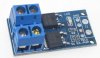
Just read this which means an aux PVM controller board or using one of the above mentioned RGB controllers.
 
ESP8266 has only software PWM. There are known issues with low and high duty cycles (flickering) especially when you have network traffic. I think there won't be a satisfying solution using software PWM if your device has still some other work to do. What I could think of is the use of hardware pwm with something like https://www.adafruit.com/product/815. I2C is impemented so we would "just" need a driver and maybe a board layout like my IRremote extension to fit into the sonoff.
 
Did a search yesterday on firmware upgradable LED controllers. 
 
There are a bunch out there and most of them are less than $10. 
 
Personally was looking for one that would be easy to JTAG with exposed pins or traces for pins.   
 
The author of the ESPurna - Tinkerman seems to have tested the many WiFi LED controllers.
 
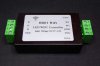
They are all very similiar.  Some weeks ago I talked about the Magic Home LED Controller as I was adding support for it in my ESPurna firmware. At the time a user pointed me to the H801 Led WiFi Controller by Huacanxing. The user in question (Minh Phuong Ly) even did a pull request with some preliminary support for it. So I decided to give it a go.

The H801 is a 5 channels controller that you can find for about 9-10€ at Ebay or Aliexpress. It’s slighly more expensive than the Magic Home Led Controller (you can find the later for 7€ at Aliexpress) but it also is quite different from the insides…

The outsides

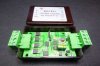
The first thing you notice is that this is quite bigger than the one by Magic Home. The later has also more “common” connectors both for power supply (the typical 2.1×5.5mm jack) and the strip connector since most have the same 4 lines for each channel (red, green and blue) and the common anode for power. The H801 uses screw terminals for every connection, input GND and VCC and the five channels (red, green, blue and two whites) and also the common anode.

So the Magic Home is more ready for plug and play while the H801 is a more adaptative solution.

The insides

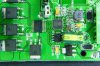
The H801 has four philips screws in the back and once you remove them you gain access to the insides of the controller. Things to notice: each channel is driven by a beefy DTU35N06 [pdf, datasheet] by Din-Tek, a 60V N-channel mosfet in a TO-252 package. These are rated 35A or 106W maximum power disipation and they use quite some space on the board, with thick traces running to the terminals. The ESP8266 interfaces the mosfets via an NXPHC245 DTU35N06 [pdf, datasheet] bus transceiver that does the level shifting.

The W1 and W2 lines are routed back to the terminal using wires on the back, I guess the ran out of space in the PCB. Also on the back there is a AOZ1212AI [pdf, datasheet] buck regulator that is problably set to 5V output. And then the usual ASM1117 [pdf, datasheet] to lower it further down to 3V3 for the ESP8266.

All in all it looks more roomy. Even thou I don’t know what mosfets the Magic Home Led Controller uses they are SOT-23 packages. The ones in the H801 look more solid. But the specs for both controllers are the same (according to some sources): 48W per channel. I’m not sure I would use 4A per channel on my 12V strips with the Magic Home controller, but I might try with the H801.

Flashing it

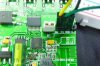
Another good thing the H801 has it that it exposes the required GPIOs for firmware flashing in an easy way, not the small pads in the Magic Home controller. There is a header with 3V3, GND, RX and TX labeled and a jumper to tie GPIO0 to ground when you want to boot into flash mode.

ESPurna firmware supports H801 since version 1.8.0. It is defined by default as a 5-channels device (LIGHT_PROVIDER_RGB2W). If you want to use it with a standard RGB LED strip you might want to change the light provider to LIGHT_PROVIDER_RGB in the hardware.h file.

To flash it add the jumper to J3 and connect the cables. Be aware that the labels in the header are from the programmer point of view, so wire TX to your programmer TX and RX to RX. If you are already powering the board via the screw terminals you don’t have to wire the 3V3 pin. Then run (assuming you already have PlatformIO installed):

Once you have ESPurna in the H801 you can control your lights via MQTT, the REST API or third party home automation systems like Domoticz or Home Assistant.
Other references

These boards have been around for a while already and I’m not the first to review them or even reflash them. Check Eryk’s blog for another review and more code.  Also Andreas Hölldorfer has an in depth review of the board.

One curious thing about those two post is that in the pictures you can clearly see that the mosfets in those boards are different from what I found in mine. They use 20N06L [pdf, datasheet] by OnSemi very similar to the DTU35N06 but with a maximum power dissipation of 60W (the 20 in 20N06L stands for 20A and the 35 in 35N06 for 35A). Aside from that the boards look exactly the same.

Also, I’d like to recommend you reading a great project by Denys Parnell where he shows how to repurpose the H801 as a motor controller. Very cool and so cheap!


Attachments

  • 801-1.jpg
    801-1.jpg
    18.5 KB · Views: 0
  • 801-2.jpg
    801-2.jpg
    7.8 KB · Views: 0
  • 801-3.jpg
    801-3.jpg
    12.5 KB · Views: 0
  • 801-4.jpg
    801-4.jpg
    10.9 KB · Views: 0
Reading and searching endeavor showed me the popularity of open source automation software like OpenHAB, Home Assistant and Domoticz with default firmware associations to said open source automation software and Mosquitto.

Ordered it from Ebay at less than $10 with free shipping. It is twice the price on Amazon.

I still want a manual pot on the device such that will be installing it in a same sized project box with Sonoff SV.
 
Continuing the under counter LED endeavor here. 
 
Made up two more aluminum rails with diffusers and testing lighting with SMD5050 LEDs. 

These LEDs are on both side cabinets next to the stove and microwave.

Meets WAF relating to stove top illumination and food preparation.

I used the small plastic LED ribbon clips and soldered the power wires. Sort of PITA to do this.
 
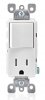
Purchased another LED transformer to put inside one 4X4 box with a single outlet mudplate and a decora single paddle with outlet switch.
 
outlet.jpg
 
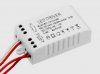
LEDDriver.jpg
 
Found a cheap and small 120 VAC to 1 AMP LED driver with dimming and giving it a try UPB to see how it works while concurrently switching my SonOff SV LED automation thing to using an automated RGB dimmer (for one channel).

This related to new installation of indirect LED lighting over some book shelves. Noticed that using 5000k SMD5050 is way too bright and white so testing warm 3000k over book shelf lighting.

Installed the small 120 VAC dimmer yesterday using a UPB lamp module. It works.

I like the dimming control better at the 12VDC level. Still waiting on the upgradable firmware RGB dimmer.
 
Back
Top