

Did you know that there is finally a way of controlling your CE based touchscreen remotely? When you have a CE based touchscreen, it can be rather cumbersome having to update or make changes to the unit due to the physical location, and since they are usually wall mounted, you can't just grab it and put it on your desk.
Many units come without Active Sync (i.e., the Elk TS07), meaning it is impossible to install some of the existing applications out there (and that's if they support the sometimes odd resolutions). There is an application out there called MyMobileR which provides VNC like access to your CE device (or PDA/smartphone).
You can either install it through Active Sync, or just copy the single .exe file to the CE device, and execute it, no configuration is needed to get it to work. Best of all, it's completely free!
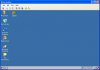
I just installed it on my Elk TS07, and it is working great. People mostly use this application to control their smartphones, and while CE isn't listed as officially supported, I had no problems getting it to work. Enjoy!
Many units come without Active Sync (i.e., the Elk TS07), meaning it is impossible to install some of the existing applications out there (and that's if they support the sometimes odd resolutions). There is an application out there called MyMobileR which provides VNC like access to your CE device (or PDA/smartphone).
You can either install it through Active Sync, or just copy the single .exe file to the CE device, and execute it, no configuration is needed to get it to work. Best of all, it's completely free!
I just installed it on my Elk TS07, and it is working great. People mostly use this application to control their smartphones, and while CE isn't listed as officially supported, I had no problems getting it to work. Enjoy!


