Samsung A32. When I am leaving and about half a block from my house my phone is unusable until I manually turn off wifi. Seems like it should switch automatically as the cell signal is good here but I have found numerous other complaints about this. Apparently there used to be a setting that would address it but it has been removed in more recent versions. I saw some suggestions for Tasker app and have thought about getting it before (forget exactly what I was wanting to automate). Figured I would see if anyone here had any suggestions. TIA.

You are using an out of date browser. It may not display this or other websites correctly.
You should upgrade or use an alternative browser.
You should upgrade or use an alternative browser.
Samsung A32 hangs onto unusable wifi signal and can't find option to fix...
- Thread starter JimS
- Start date
Not that I have found. From what I have read earlier versions of Android had something like that but apparently it isn't there in recent versions. I only found others complaining about the same issue. Seems crazy there isn't a setting that would fix it. When I google it I get many places that say manually turn off wifi and turn it back on. I shouldn't have to do that. As I understand it in Tasker you can set up rules such as if wifi signal level is below x then turn off wifi and then turn it back on. Android won't start connection if wifi is poor but it keeps it if already connected. Tasker can also do things based on location or many other things so seems like a useful program for other things too. But I haven't gotten it yet.Yeah, that is pretty much how it works. iOS has a feature called "Wi-Fi Assist" which says "Automatically use cellular data when Wi-Fi connectivity is poor." Anything like that in Android?

pete_c
Guru
Here have a TCL T671G with Android version 12. I turn the phone on some 30 minutes before I leave the house. It connects to WiFi right away.
It remains connected to Wifi in the driveway and switches to cellular data once I am in the street. I have a T-Mobile LTE repeater in the house.
So Googling (with AI) some...
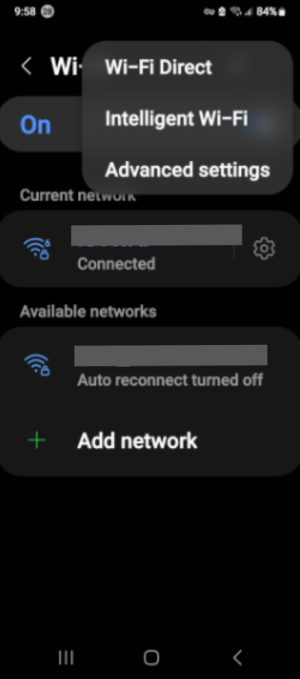
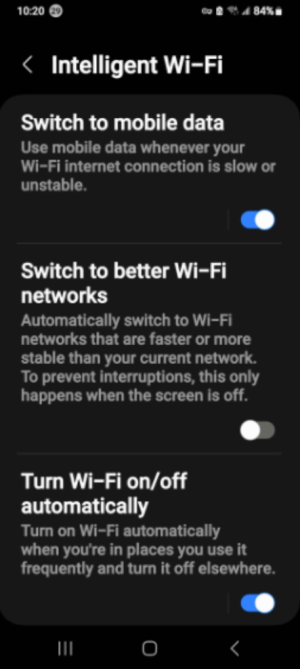
To fix Android Auto switching from Wi-Fi to cellular, enable "Switch to mobile data" in your phone's Wi-Fi settings to handle weak car Wi-Fi signals. For Samsung, go to Settings > Connections > Wi-Fi > Intelligent Wi-Fi > Switch to mobile data. For others, check Settings > Network & Internet > Wi-Fi > Network preferences.
What are the specs of your cellular connectivity right outside of your home (5G / LTE)? Use Signal Strength on Google Play store. Remove it when your are done. This app shows cellular and wifi signals.
Key Solutions:
So the issue could be related to your cellular signal strength inside and outside the house. I look a the repeater I have configured in the master bedroom here and see the signals always fluctuate between 2 bars and 4 bars.
It remains connected to Wifi in the driveway and switches to cellular data once I am in the street. I have a T-Mobile LTE repeater in the house.
So Googling (with AI) some...
To fix Android Auto switching from Wi-Fi to cellular, enable "Switch to mobile data" in your phone's Wi-Fi settings to handle weak car Wi-Fi signals. For Samsung, go to Settings > Connections > Wi-Fi > Intelligent Wi-Fi > Switch to mobile data. For others, check Settings > Network & Internet > Wi-Fi > Network preferences.
What are the specs of your cellular connectivity right outside of your home (5G / LTE)? Use Signal Strength on Google Play store. Remove it when your are done. This app shows cellular and wifi signals.
Key Solutions:
- Fix Persistent Disconnects (Samsung): Go to Settings > Connections > Wi-Fi > Intelligent Wi-Fi and turn off "Switch to better Wi-Fi networks" if it keeps disconnecting from your car, as noted on this Samsung forum.
- Ignore Car Wi-Fi: If your car provides a Wi-Fi hotspot without internet, your phone may switch to cellular. In your Wi-Fi settings, find the car's network, select settings, and disable "Auto-connect".
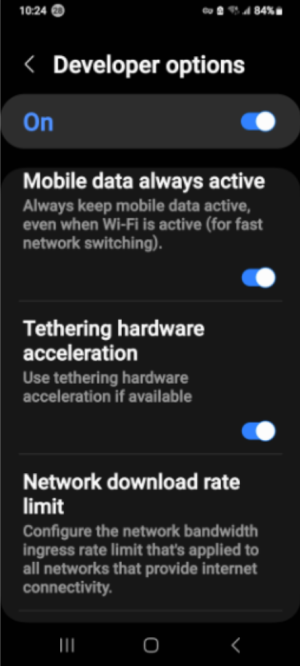
- Developer Options: If the issue persists, enable Developer Options (tap Build Number 7 times) and toggle on "Mobile data always active" to prevent switching delays, suggested in this Android Central thread.
- No Internet on Car WiFi: The phone detects the car's WiFi but no internet data, forcing a switch to cellular for navigation/music.
- Weak Signal: The Wi-Fi signal from the car is unstable, prompting an automatic switch to cellular.
- Android Auto Requirement: Wireless Android Auto uses Wi-Fi Direct, which can conflict with standard Wi-Fi connections.
So the issue could be related to your cellular signal strength inside and outside the house. I look a the repeater I have configured in the master bedroom here and see the signals always fluctuate between 2 bars and 4 bars.
I have a Samsung S20+, Android version 13
Here are my available settings (Mobile data always active), I am going to try it out, thanks Pete:
What happens to me is if I am on a Wi-Fi Calling call and in leaving the house, it does not switch/transfer, the call will drop, which makes sense.
I try not to connect to my home Wi-Fi but we have pretty bad cell service where we live so if I am watching YT or streaming, Wi-Fi is a must for us.
Trying to develop a habit to turn Off my Wi-Fi when leaving the house.
Here are my available settings (Mobile data always active), I am going to try it out, thanks Pete:
What happens to me is if I am on a Wi-Fi Calling call and in leaving the house, it does not switch/transfer, the call will drop, which makes sense.
I try not to connect to my home Wi-Fi but we have pretty bad cell service where we live so if I am watching YT or streaming, Wi-Fi is a must for us.
Trying to develop a habit to turn Off my Wi-Fi when leaving the house.
Wi-Fi calling is never going to stay connected from Wi-Fi to cellular, so keep that in mind.
You think YOU have problems...I have Visible which is owned by Verizon. Have had it about 1.5 years. No problems until about a month ago. My signal in my house dropped to ZERO. My wife's phone as well. If we drive a mile or two away it returns, but at our house ZERO. WiFi calling works, that's it. I was on Chat with them for four hours and no resolution. Today I was going to switch carriers but it came back, so I am crossing my fingers it stays working.
You think YOU have problems...I have Visible which is owned by Verizon. Have had it about 1.5 years. No problems until about a month ago. My signal in my house dropped to ZERO. My wife's phone as well. If we drive a mile or two away it returns, but at our house ZERO. WiFi calling works, that's it. I was on Chat with them for four hours and no resolution. Today I was going to switch carriers but it came back, so I am crossing my fingers it stays working.
I feel ya. We can go in our back yard and avg. about 40Mbps, which works, but go in our house, we get less than 2Mbps avg. We can get calls and make them but often they drop, Wi-Fi calling is our present answer. Our tower is 2.8 miles away. I have entertained having an antennae in the backyard but the cost to us does not out weigh the benefit.Wi-Fi calling is never going to stay connected from Wi-Fi to cellular, so keep that in mind.
You think YOU have problems...I have Visible which is owned by Verizon. Have had it about 1.5 years. No problems until about a month ago. My signal in my house dropped to ZERO. My wife's phone as well. If we drive a mile or two away it returns, but at our house ZERO. WiFi calling works, that's it. I was on Chat with them for four hours and no resolution. Today I was going to switch carriers but it came back, so I am crossing my fingers it stays working.
Sad we have to use OUR Internet to be able to use our cell phones.
At your next update time, maybe consider US Mobile. They work with Verizon, T-Mobile and ATT and you can switch from one to the other. They even have a plan where you can have multiple carriers. I live in a big gated HOA, and I don't think they let in cellular antennas, If you don't mind investing a few hundred dollars, they do make these amplifiers, you mount an antenna outside and another inside and they can help with weak signals.I feel ya. We can go in our back yard and avg. about 40Mbps, which works, but go in our house, we get less than 2Mbps avg. We can get calls and make them but often they drop, Wi-Fi calling is our present answer. Our tower is 2.8 miles away. I have entertained having an antennae in the backyard but the cost to us does not out weigh the benefit.
Sad we have to use OUR Internet to be able to use our cell phones.

BraveSirRobbin
Moderator
This was a long time ago (ten years) but I called AT&T and told them that where we moved, I could not get a cellular signal inside our house and wanted to cancel and switch. They offered to give me one of those amplifiers for free if I stayed with them (I didn't).
Thanks guys. One thing I discovered is all the carriers available are on that same tower that is 2.8 miles away. Our daughter has Verizon and her husband AT&T so we have been able to check their signal in our house. They have the same signal strength as our T-Mobile. Our best is 4g due to distance, we don't even connect at 5g. I turned off 5g on both of our phones so they don't try to connect.
We live out in the country, moved here a couple of years ago. We are blessed with this 10 acre retirement property, no HOA or POA, fully wooden which does not help our signal either . We have a 1/2 acre pond, a pool, a pool house, a 3 vehicle size open barn, a 700 sq. ft. shed, newer built house so tech shield radiant barrier in attic may not help our signal either. It is paradise out here compared to the big city we moved from. So quiet here, no light pollution, stars are very bright, air quality is great, I have not been sick once living out here, yes even with all these woods, the folks here are very friendly, polite, wave and say hi. We are living in the Twilight Zone I tell ya
So the trade off of 5g city signal to living out here is worth it to us. Oh yeah, get this, we have DSL Internet, haha, 25Mbps, haha. We went from 1gig speed to 25megs, lol
T-Mobile did give us for free a CellSpot but they disconnected them last year. It was 4g, so thinking since 5g is all the rave, they are focusing on it, just a guess. Heck 6g is next...no need for towers...
We live out in the country, moved here a couple of years ago. We are blessed with this 10 acre retirement property, no HOA or POA, fully wooden which does not help our signal either
. We have a 1/2 acre pond, a pool, a pool house, a 3 vehicle size open barn, a 700 sq. ft. shed, newer built house so tech shield radiant barrier in attic may not help our signal either. It is paradise out here compared to the big city we moved from. So quiet here, no light pollution, stars are very bright, air quality is great, I have not been sick once living out here, yes even with all these woods, the folks here are very friendly, polite, wave and say hi. We are living in the Twilight Zone I tell ya So the trade off of 5g city signal to living out here is worth it to us. Oh yeah, get this, we have DSL Internet, haha, 25Mbps, haha. We went from 1gig speed to 25megs, lol
T-Mobile did give us for free a CellSpot but they disconnected them last year. It was 4g, so thinking since 5g is all the rave, they are focusing on it, just a guess. Heck 6g is next...no need for towers...
Not sure what you are paying for the DSL line, but if Starlink is available, it has been very good for us out in the boonies..Thanks guys. One thing I discovered is all the carriers available are on that same tower that is 2.8 miles away. Our daughter has Verizon and her husband AT&T so we have been able to check their signal in our house. They have the same signal strength as our T-Mobile. Our best is 4g due to distance, we don't even connect at 5g. I turned off 5g on both of our phones so they don't try to connect.
We live out in the country, moved here a couple of years ago. We are blessed with this 10 acre retirement property, no HOA or POA, fully wooden which does not help our signal either
So the trade off of 5g city signal to living out here is worth it to us. Oh yeah, get this, we have DSL Internet, haha, 25Mbps, haha. We went from 1gig speed to 25megs, lol
T-Mobile did give us for free a CellSpot but they disconnected them last year. It was 4g, so thinking since 5g is all the rave, they are focusing on it, just a guess. Heck 6g is next...no need for towers...
I believe it is, heard of others around here using it, but some were saying as a backup. Does yours stay online 24/7 or is it like other satellite services that are hindered by weather? Just curious. With all our trees, Starlink pointing straight up should work for us.Not sure what you are paying for the DSL line, but if Starlink is available, it has been very good for us out in the boonies..
Back in the early 2000's, from maybe 2007 - 2011, I used to work in this industry, and back then, cellular providers came out with these mini base stations. If your coverage was bad, they would send you one for free. It was like a WiFi hotspot, but was a cellular transmitter that you connected to your Internet, and your phone could work with them. In fact, they would work for visitors and your neighbors as well. They were called femtocells. Cellular over WiFi has basically killed them off.
Similar threads
- Replies
- 19
- Views
- 4K