HAI OmniPro2 Ethernet Port Issues

Ok guys... 
 
I have tried everything... here is the list...
 
Ehternet Port Not Working... Facts as I know them:
 
1) Omnipro is up and running via the Console...
2) Rebooted / power cycled the router, switch, and Omnipro2
3) Verified Encryption Key is the same in PCAccess and Console
4) Ensured using the same port.
5) Verified cable from Omnipro 2 to Switch is good (checked with cabletester)
6) System was working at one point.
7) Since delivery of Omnipro2 (1 month ago) Ethernet port on HAI is a little loose... however was functioning until today
8) No light on switch to illustrate connectivity to Omnipro2 (was orange light at one point)
 
If i havent missed anything, is the only recourse to send the board back to HAI? If so, are they good about it?   How does that process work and whats the usual turnaround time? 
 
Needless to say, not happy... 
 
Cheers, Mark 


Yup; the networking LEDs next to the NIC port should blink and be on. The network port is always on; whether configured or not. 
 
That said you can only tell though if its plugged into a switch or PC (with a crossover cable).
 
I used to have a cat5e cable with a boot thingy on it.  It was very difficult to remove such that I went to a naked RJ-45 end.  That said my port is a bit floppy too; still working though.  Thinking about it 2-3 HAI OPIIs this past year had floppy NICs even new never used ones.
 
Have you tried to press down a touch to check to see if any of the NIC solder leads are broken?
 
RMAing it is no big deal.  The turnaround time depends.  Ask them.  I think too you can pay to expedite it.
 
I did have an issue with the network port becoming too promiscuous and shutting down the network and being able to not ping or connect to it.
 
HAI CS told me about this as I was about to send my panel in for repairs; as it would work for only days at a time.
 
I have since moved the panel behind a router and do not have this issue anymore. 
 
I did try to put the HAI OPII in a VLAN and tweaked out the managed switch for it to no avail though.
 
I have another OPII and its on a small network; I never have an issue with it though.  Here I am to using all of my subnet mask /25.
 
The issue also messed with my serially connected Omnistat Thermostat and Omnitouch screens.
 
You can test the network thing by plugging the panel into a little switch by itself after doing a warm reset of the panel.  If it works; then that might be your issue.
 
Hello newbee here
 
 
I have a similar problem with omni pro 2
 
when connected to the home router the led is lit and flashing
 
ping does not return an answer and cannot connect with dealer pc access
 
I can get it to work with a switch and a cable to the laptop connects right away pings etc.
 
any idea why I cant connect with the router
 
Welcome to the forum nmcnmr.
 
The flashing indicates that you have transport.  The un pingable piece means that the IP configured on the OmniPro panel is not in the same subnet as the router IP.
 
Post here the IP you have configured on the OmniPro 2 panel and post here the subnet and subnet mask you have configured with the router.
 
It is a simple configuration on the OmniPro panel with no subnet mask, no dhcp, no gateway or DNS address.
 
Hi Pete, I've read through many of these OmniPro II connectivity posts, trying to figure out why I cannot get Snap-Link to "see"/connect to my OPII controller (UnableToOpenSocket error). Hoping you can help. Here's where I'm stuck, and a summary of what I've tried:

1. When I ping the OPII's IP address displayed on the panel, I get "Destination Host Unreachable"
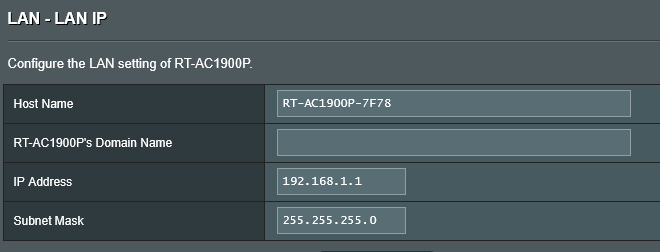
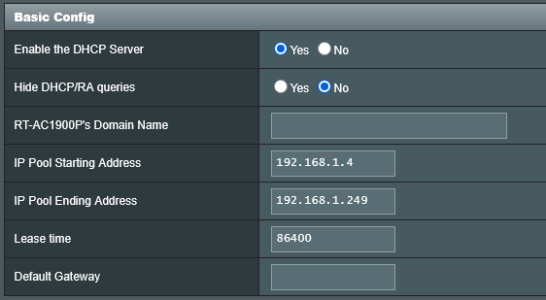
a.) OPII's IP address (xxx.xxx.1.250) is within the subnet mask (255.255.255.0) and outside the range of the DHCP pool defined in my Asus RT-1900P router (xxx.xxx.1.2 thru xxx.xxx.1.249).
b.) I rebooted the HAI controller after assigning it this IP address

2. Ethernet cable connection to the HAI board's e-net port is good (continuity test is positive)

3. Two LEDs on the HAI board, adjacent to the e-net port: LEFT=solid red, RIGHT=blinking red

4. On my router, I've port forwarded the HAI port# (entering OPII’s port# into the "internal port" field in my router's port fwd config)

5. Cross Connect: I've attempted to connect my laptop directly to the HAI controller using a cross connect cable (after setting my laptop's IPv4 address to 1 digit lower than the HAI controller's IP address. RESULT: "Destination Host Unreachable" when I ping the OPII’s IP; and "No internet connection" error in Snap-Link (when I changed laptop's IPv4 address for the Wi-Fi adapter)
a. On my laptop, I wasn’t sure if I should change the IPv4 address for my wifi adapter or my wired ethernet adapter that is cross connected into the OPII's NIC. I tried both, and still no Ping response.

Any ideas?
 
Hello @mjs.

Welcome to the Cocoontech forum.

The IP you have configured for your OP2 is outside of range (xxx.xxx.1.250). Change the IP to something inside of your network and not in DHCP range. IE: like xxx.xxx.1.1 maybe.

Then try to ping the IP of the OP2 panel inside of your home network with a laptop or pc.

We can address the Snaplink connection after you have established that you can ping the IP address.
 
Hello @mjs.

Welcome to the Cocoontech forum.

The IP you have configured for your OP2 is outside of range (xxx.xxx.1.250). Change the IP to something inside of your network and not in DHCP range. IE: like xxx.xxx.1.1 maybe.

Then try to ping the IP of the OP2 panel inside of your home network with a laptop or pc.

We can address the Snaplink connection after you have established that you can ping the IP address.
I'm new to networking but trying to learn, so appreciate your patience. My understanding based on some Google searches and ChatGPT is that
with a router IP of 192.168.1.1 and a subnet mask of 255.255.255.0 my your network contains:
  • Network address: 192.168.1.0
  • Usable host range: 192.168.1.1 – 192.168.1.254
So i thought 192.168.1.250 would be within the range, but I must not be understanding this. What is the range of IPs that are within range for this subnet?
 
I'm new to networking but trying to learn, so appreciate your patience. My understanding based on some Google searches and ChatGPT is that
with a router IP of 192.168.1.1 and a subnet mask of 255.255.255.0 my your network contains:
  • Network address: 192.168.1.0
  • Usable host range: 192.168.1.1 – 192.168.1.254
So i thought 192.168.1.250 would be within the range, but I must not be understanding this. What is the range of IPs that are within range for this subnet?
... no luck. I tried xxx.xxx.1.3 and same result: "Destination host unreachable"
 
1763907631226.png

1763907657221.png

I just changed the DHCP IP pool to start at .4 and end at .249 because I was testing if the OP2's IP of 168.1.3 or xxxx.1.250 would work; neither did. Everything i read says to keep the OP2's IP within the subnet, but outside of the DHCP range.
 

Attachments

  • 1763907812541.png
    1763907812541.png
    6.5 KB · Views: 1
  • 1763907828980.png
    1763907828980.png
    3 KB · Views: 1
From the above looks like you may have done the below stuff already and not getting a response right now.
It could be an issue with the cables.

Note that no software will work until you can prove out the IP connection on the OP2 panel.

So 192.168.1.3 would work. 168.168.1.250 is outside the subnet range and would not work.

So program your OP2 with 192.168.1.3 via a console and take a picture of the IP with your phone.

Use a laptop / PC on the same subnet and try to ping the address of 192.168.1.3.

If no response then connect an ethernet cable to the ethernet port on the OP2 panel and try to ping the 192.168.1.3 address again.

If no response then you might have a hardware issue with the network chip or interface or network cable on the OP2.

Also power the panel down disconnecting the battery and AC adapter, power it up then try to ping again.
 
Thanks. I've tried all of the above and still not ping'able. I tested continuity of the cable all the way to the HAI board, and it's good. I guess it might be a hardware / NIC issue. Two remaining questions:
1.) when i connect directly from my laptop to the HAI board, I should use a cross connect cable--not a standard network cable, correct?
2.) You said above that 192.168.1.250 is outside the subnet range. What is the highest IP address/number that is still in my subnet range? (I'm still unclear on how this works and want to understand it). Thanks!
 
Last edited:
If you assign 192.168.1.1 as your router address and 255.255.255.0 as your mask, then addresses from 192.168.1.2 to 192.168.1.254 are available
for DHCP. The 192.168.1.255 address is a special case so lets ignore it for now. Theoretically you should always assign the HAI an address outside the DHCP range. Your router also has a pool setting so what you did is fine. 192.168.1.2 and 3 and 192.168.1.250-254 are available to be assigned to static ip devices.
 
What is the highest IP address/number that is still in my subnet range?

Apologies high IP for your subnet would be 254 as @dwalt mentioned. 250 is not outside your range as I mentioned before. IE: it is right above your dhcp range.

You do not need a cross connect cable to test. Any cable will work.

How are you programming the IP? Via console keypad?

Take a picture of the console with the IP address that you have programmed.
 
I'm not by the panel now so can't send a photo, but I programmed the HAI controller via the panel. It sticks every time i change it so pretty confident that it's right. I've even rebooted the whole HAI system after setting the IP, still no ping. If the ethernet port on the HAI controlller is loose or not working, will the 2 LEDs still light up? (left one is on solid red, right one is flashing red)?
 
Back
Top