SnapLink replacement

I very recently found cause to purchase a new cell phone, and when I was installing software on it I was distressed to find SnapLink is no longer available from Google Play store. It doesn't even show up in my purchase history.
This is catastrophic because I use SnapLink on my phone to interface with my OP2 on my home LAN, have been continuing to develop my home automation, and handheld device access is critical.
Yes, I'm aware of SnapLink Mobile, but having been bitten by that programmer once, as well as having concerns with Data Shared (particularly location) as well as in app purchases and ads, I am trying to avoid it. I have reached out to Leviton to see if they have released the SnapLink APK for installation at the User's risk, and am awaiting a response.
In the meantime, I am asking Cocooners what they use to interface with an OP2 from their handheld devices. I own Homeseer, but from when I had it running I recall that it was more oriented to automation than as a handheld interface.
I am also aware of Home Assistant but have never tried it.
As are we all, I am looking for small hardware footprint, and above all versatile interface across multiple handheld platforms ranging from phones to tablets. Ease of use would also be a benefit.
 
Homeseer has evolved and the Omni Plugin works nicely. That said I also use Home Assistant with OmniLinkBridge. Works great.

Apkpure has the Android Leviton Snaplink for download here==>

With respect to OmniLinkBridge, I now have Home Assistant running on Proxmox, and am trying to configure OmniLinkBridge.

In OmniLinkBridge configuration tab, when I enable mqtt_enabled, there are settings called mqtt_server, mqtt_username and mqtt_password. Are they looking for home assistant IP, UN, and PW, or something else?
 
FOUND: A Replacement for SnapLink Remote Control App for iOS and Android.

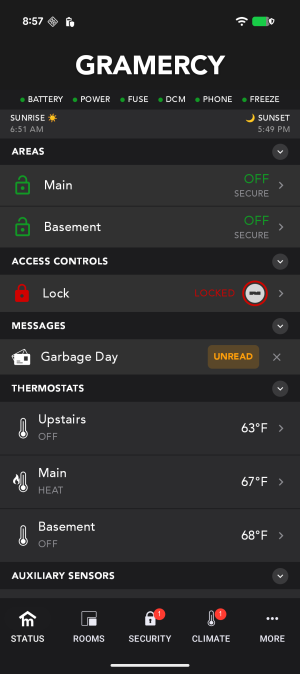
I, like I'm sure many of you, was bitten by SnapLink becoming defunct, and spending LOTS of time trying unsuccessfully to get it to work. I discovered MYRO:HOME, a brilliant app specifically for Leviton/HAI Home Automation Systems. You'll find it at https://www.myrocontrol.com/myrohome/. It, of course, requires your internet / LAN to be working. It gives you worldwide control over Security, Climate, Control (lighting) and gives you status of your system vitals like battery, power, DCM, phone, freeze, and identifies any sensors or zones that are "NOT READY," or "BYPASSED" (which you can do remotely too, if needed, e.g.-a PIR Motion Detector consistently falsing and initiating a Burglar Alarm). Their tech support is superb. I've received email responses to Support Tickets 24/7 usually in a matter of hours, if not minutes.
Terry Z
 
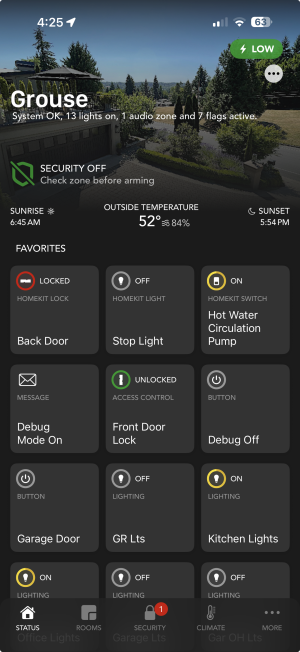
Hi! I finally finished the Android version of Myro:Home... ping me if you want to beta test -- will be in the Google Play store soon...

home.png
 
Myro:Home Helper (with loads of new features) and an update to Myro:Home for iOS will be released soon as well.

Also a newer, complete redesign for iOS called Myro:Home Pro will also be out soon as a new app (don't worry, Myro:Home will still be supported).

Our HAI/Leviton systems are still relevant and like nothing else available!
 
I am using SnapLink a little. Went back to SnapLink after the paid OmniLink II (which looked very promising) went south. I use Android an would be willing to test it out your beta. Let me know how.
Hi! I finally finished the Android version of Myro:Home... ping me if you want to beta test -- will be in the Google Play store soon...
 
Last edited:
Hi! I finally finished the Android version of Myro:Home... ping me if you want to beta test -- will be in the Google Play store soon...

View attachment 11812
Hi Mavromatis,
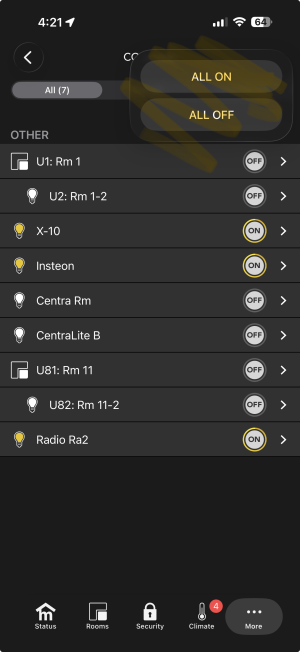
I'm sure Android users will be ecstatic to have such a great app. As you know, I'm an iOS user and have been thrilled with the product. A couple of small tweaks I would like are the ability to turn ALL light Controls ON or OFF like i can with the keypads. Also I would like the individual Control icons to be Green when they're ON. One other slightly annoying issue is that my MyroHome is reporting Smoke NOT READY and Heat NOT READY yet OmniProII is reporting all OK.
Unrelated, just FYI, for months I had a problem with OmniProII not being able to call the Central Office in event of an Alarm or routine scheduled comm check. This occurred after Century Link switched my landline that had been working for years from analog to digital. The solution was to install an Ooma Analog Telephone Adapter to convert OmniProII's signal to digital. Other users on the forum reported similar success.
Thanks for an excellent product that cured many months of angst with SnapLink.
Warm regard,
Terry Z.
 
Back
Top